
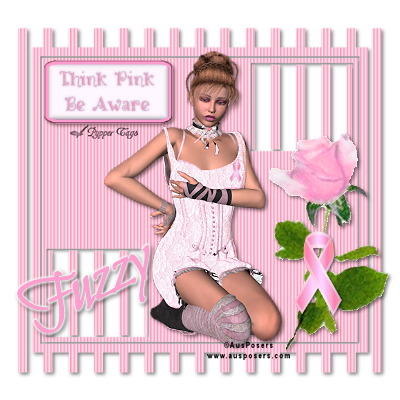
This tutorial is written for those with a working knowledge of PSP. Any resemblance to any other tutorial is purely coincidence.
Supplies Needed
Scrapkit Breast Cancer Awareness Kit 5 FTU by AusPosers HERE
WSL_MASK296 HERE
Eye Candy 4000
1 Tube of choice
(the tube I used is a commissioned tube by AusPosers and is not available for use)
Open your supplies in PSP.
I use PSPX2 but any version will work.
Open a new image 400X400 flood fill with white.
Add a new raster layer
Copy the Pink Blinds Paper from the scrapkit and paste as a new layer.
Layers/Mask Layer From Image.
Choose the WSL_MASK296 mask
Delete the Mask.
Merge group layer.
Add a drop shadow of choice.
I used 2, 2, 50, 5 color black.
Paste the tube of your choice as a new layer
Resize as needed and place tube where you would like (refer to preview) and add the same drop shadow.
Add any of the embellishments from the kit you would like to use (refer to preview) and drop shadow each.
For the name I used the font Bilbo.
Color #ff9dce your font size will vary depending on the size of the name.
Convert layer to raster.
Selections, select all, float, defloat.
Effects, Eye Candy 4000, Gradient Glow
See images for settings.


Selections select none.
Add all copyright credits!!!!!
Add your name.
And save as a .png or .jpg.
I hope you enjoyed this tut!!!








No comments:
Post a Comment